
Summary
This month’s releases includes several user-facing enhancements focused on improving schedule clarity, progress tracking, and day-to-day usability.
We added support for tracking and editing % Complete directly in the Gantt chart, introduced earliest start date constraints at the group level, improved how maximum hours per day are applied to tasks with subtasks, and made recurring meetings easier to understand by clearly showing their full time impact across the project.
Alongside these enhancements, much of December was spent on significant under-the-hood platform work to further modernize BuilderPlan’s subscription and licensing infrastructure. While largely invisible to users today, this work lays important groundwork for upcoming self-serve capabilities and future product improvements.
% Complete Now Visible and Editable in the Gantt Grid
You can now view and edit % Complete directly in the Gantt chart grid.

Key details:
% Complete is editable directly in the Gantt grid for individual tasks.
When enabled in the Gantt view, % Complete is included in exported Gantt PDFs, making progress visible in shared reports.
Group, resource, and project-level % Complete values are automatically calculated based on underlying task progress.
This provides a consistent and reliable way to track progress from the task level all the way up to the overall project.
This enhancement makes it easier to keep schedules up to date and ensures progress is clearly communicated, both on screen and in exported reports.
Earliest Start Date Constraints Now Supported on Groups
You can now apply an Earliest Start Date constraint at the group level.
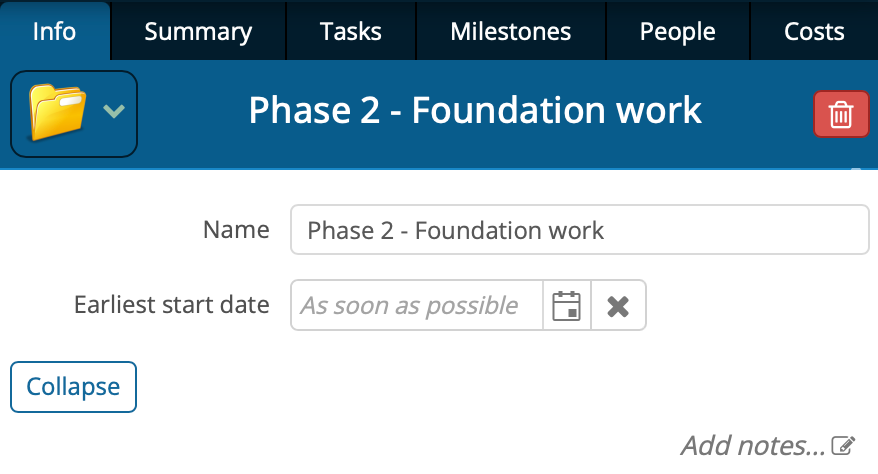
Previously, earliest start constraints could only be set on individual tasks or at the overall project level. With this update, you can control when an entire phase or group of work is allowed to begin, without needing to manage dates on each task individually.
How it works:
Set an Earliest Start Date on a group (such as a phase).
No tasks within that group will be scheduled before the specified date, regardless of logic or dependencies.
All tasks within the group will begin on or after the group’s earliest start date, while still respecting resource leveling and dependencies.
This is especially useful for:
Phases dependent on constraints not modelled in the project schedule.
Holding future work while still fully defining the scope and logic.
Simplifying schedules by applying constraints once instead of repeatedly at the task level.
This enhancement gives you more control over high-level scheduling decisions while keeping your plan clean and easy to maintain.
Maximum Hours per Day Now Applies to Tasks with Subtasks
Previously, while a maximum hours per day value could be entered on a task, it did not affect scheduling when that task contained subtasks. With this update, the setting now behaves as expected.
How it works:
Each subtask retains its own duration estimate.
A maximum hours per day value can be set on the parent task.
BuilderPlan ensures that no subtask is scheduled for more than the specified number of hours per day.
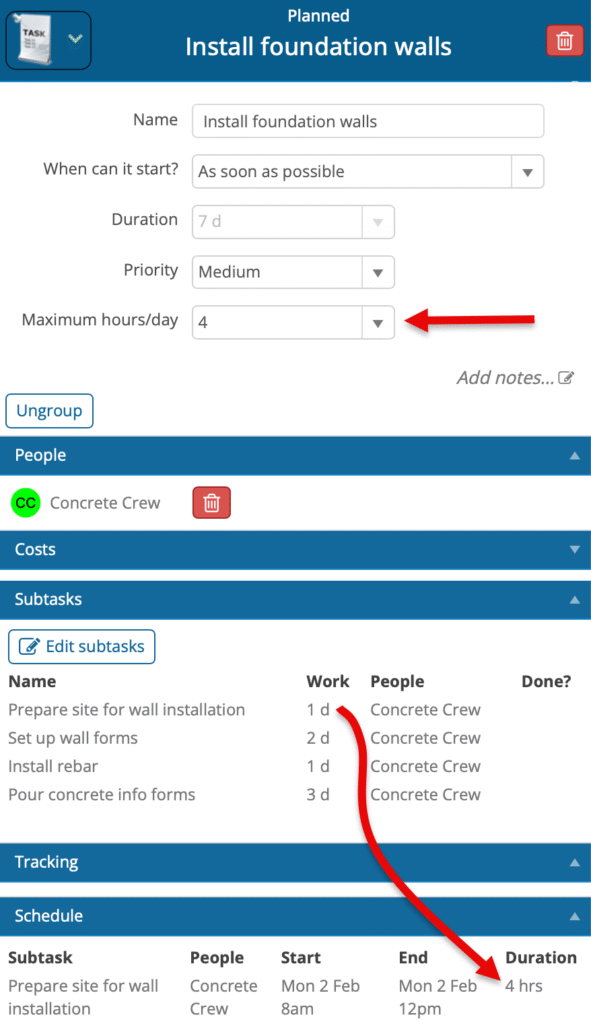
In the example shown, four subtasks are associated with Install foundation walls. Each subtask has its own duration estimate, and with a maximum of 4 hours per day set on the task, the schedule correctly limits each subtask to no more than four hours of work per day.
This improvement provides more accurate schedules when work must be spread across multiple days due to crew availability, site constraints, or partial-day work limits.
Improved Clarity for Recurring Meetings
Recurring meetings in BuilderPlan now display clearer and more accurate scheduling information.
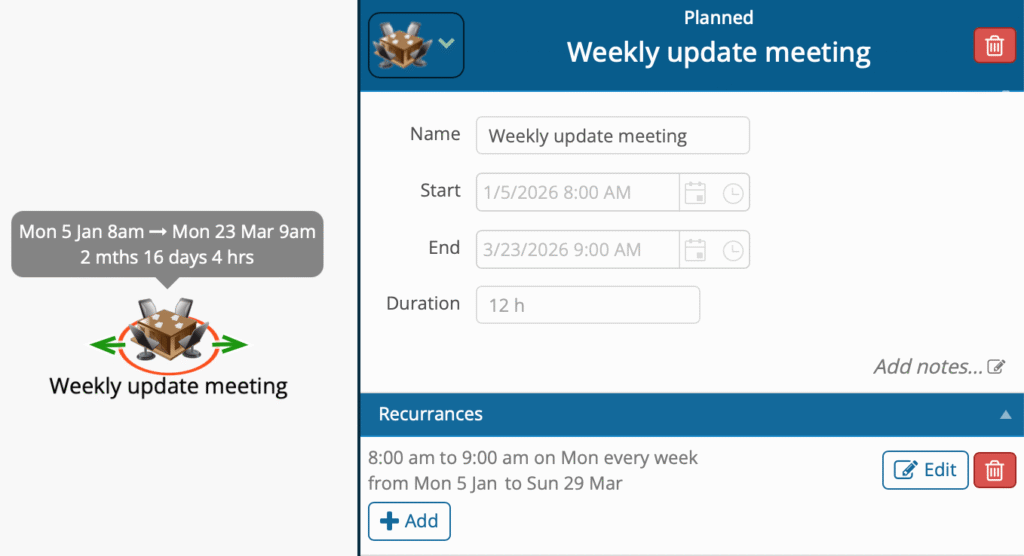
Previously, the Start, End, and Duration fields reflected only the first occurrence of a recurring meeting. While editable, changes to these fields had no effect, which could be misleading.
With this update, these fields now behave in a way that better reflects how recurring meetings are actually used.
What’s changed:
The Start field shows the start of the first meeting in the series.
The End field shows the end of the final meeting in the series.
The Duration field shows the total duration of all meetings across the life of the project.
These fields are now read-only, ensuring they accurately reflect the recurrence setup.
This provides a much clearer picture of the total time commitment associated with recurring meetings, making it easier to understand their overall impact on the project schedule.